 Nirama
Nirama Solutions
Polls that feel built into Jira
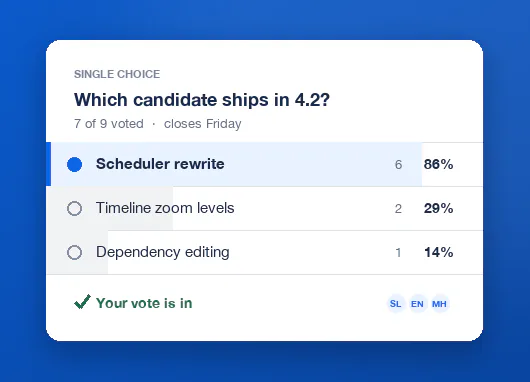
Create a poll on the issue you are debating, on the project page for team-wide questions, or on a dashboard for standing votes. Voting takes one click, and results appear instantly as tally bars that match Jira's look and feel — light and dark mode included.
- On the Atlassian Marketplace
- Runs on Atlassian
- No data egress
Decide where the work happens
FastPoll adds three surfaces, and each keeps its own separate polls — a poll created on an issue belongs to that issue only.
Issue panel
A decision about one specific ticket, right on the issue. Requires the new Jira issue view.
Project page
Team-wide questions and backlog prioritization, from the project sidebar under Apps.
Dashboard gadget
Standing votes visible to everyone at a glance, added like any other Jira gadget.
Not just multiple choice
Yes/no for quick calls. Dot voting and ranked choice for prioritization. Score polls for evaluation. Time slots for scheduling. Pick the method that fits the decision instead of forcing everything into a list.
| Type | Use it when |
|---|---|
| Single choice | One answer from a list. |
| Multiple choice | Voters may pick several. |
| Yes / No | A quick go/no-go call. |
| Rating (1–5) | Confidence or sentiment checks. |
| Meeting / time slots | Finding a slot everyone can make. |
| Dot voting | Weighing several options against each other, with a budget of dots per voter. |
| Score poll | Evaluating options independently, scored 0 to your maximum. |
| Ranked choice | Order matters — scored by Borda count, so the option everyone can live with can win. |
| Backlog prioritization | Ranking real Jira issues, with the result written back to Jira. |
The team's ranking, written back to Jira
Pick issues with a JQL query, let the team distribute dots across them, then apply the resulting ranking back to Jira — as labels, as priority, or as any number field. The vote and the backlog stay the same object, so there is nothing to copy across afterwards.
One vote per person, enforced on the server
- Anonymous polls never reveal who voted for what.
- Results can stay hidden until someone votes, or be restricted to the poll's creator — withheld from the API response, not just from the interface.
- Voters can change their vote while the poll is open.
- Auto-close at a date and time, with the outcome posted as a comment on the issue.
- Export any result to CSV or PNG.
What FastPoll stores, and where
- Stored in your tenant
- Poll definitions — question, options, settings and the creator's Atlassian account ID.
- Also stored
- Votes: each voter's account ID, their ballot and its timestamp — plus the voter's display name for non-anonymous polls only.
- Stored by us
- Nothing.All of the above lives in Forge hosted storage inside your own Atlassian tenant.
Account IDs are retained to enforce one vote per person and to let voters change their vote. Data is deleted when a poll is deleted or the app is uninstalled. The complete list is in the privacy policy and the security policy.
How FastPoll compares to the alternatives
Search the Marketplace for “poll” and you get team polls and customer-feedback tools side by side at similar prices. The comparison page separates them first, then prices them.
Get FastPoll for your Jira site
Install it from the Atlassian Marketplace, which carries the current pricing and tiers. The guide here covers every feature, every limit and the troubleshooting section.