 Nirama
Documentation → FastRisk
FastRisk documentation
A risk matrix, risk register and RAID log for Jira Cloud. Risks are ordinary Jira issues — the assessment lives in real Jira fields, so there is no spreadsheet to keep in step and nothing to import.
Applies to all released versions · Last updated 21 August 2026 · Questions? Contact support
The idea in one page
Most project risk registers are a spreadsheet nobody opens between steering meetings, while the actual work lives in Jira. FastRisk closes that gap by making a risk an ordinary Jira issue with two extra numbers on it: likelihood and impact, each on a 1–5 scale. Their product is the risk score, and the score is what the heatmap, the register and Jira's own search all read.
Three consequences worth understanding before you start, because they explain most of the rest of this page:
- There is no separate risk database. The assessment is stored in Jira custom fields on your issues. Jira's history records every change, Jira's search can query it, Jira's exports include it, and it survives the app being removed.
- Any issue can be a risk. You do not create risks in FastRisk. You assess issues you already have — a Task, a Story, a dedicated Risk issue type, it makes no difference to the app.
- Nothing needs configuring first. Install it and the fields exist, with a 5×5 matrix, conventional band thresholds and standard scale labels. You can retune all of that per project; you never have to.
Where to find FastRisk
FastRisk appears in three places, and you will use the first two most.
- On an issue — the Risk assessment panel, in the issue's details. This is where an individual risk is assessed. It needs no screen configuration from an administrator: it is there as soon as the app is installed.
- In a project — FastRisk in the project sidebar, with two tabs: Matrix and Register. This is the steering-meeting view.
- On a dashboard — the FastRisk gadget, for a portfolio view across several projects. See the dashboard gadget.
If FastRisk is not in a project's sidebar, the app may not be installed, or your subscription may have lapsed — see troubleshooting.
The six fields
FastRisk creates six custom fields when it is installed. They are locked: they belong to the app, so nobody can rename them or re-point their configuration, which is what keeps the app working the same way on every site.
| Field | Type | Notes |
|---|---|---|
| Risk likelihood | Number | 1–5. How likely the risk is to materialise. |
| Risk impact | Number | 1–5. How bad it would be if it did. |
| Risk score | Number, read-only | Likelihood × impact. Maintained by the app; not directly editable, so it cannot drift out of step with its inputs. |
| RAID type | Text | Risk, Assumption, Issue or Dependency. Blank reads as Risk. |
| Risk mitigation | Text | What is being done about it. |
| Risk review date | Date | When this assessment should next be looked at. Optional. |
All six are queryable in Jira's own search immediately. They are, however, not visible on the issue view until a Jira administrator adds them to the relevant screens — that is a Jira behaviour for app-owned fields, not a FastRisk setting. You do not need to do it: the Risk assessment panel works without any screen configuration. Adding them to a screen is worth it only if you want the numbers inline on the issue as well.
Assessing a risk
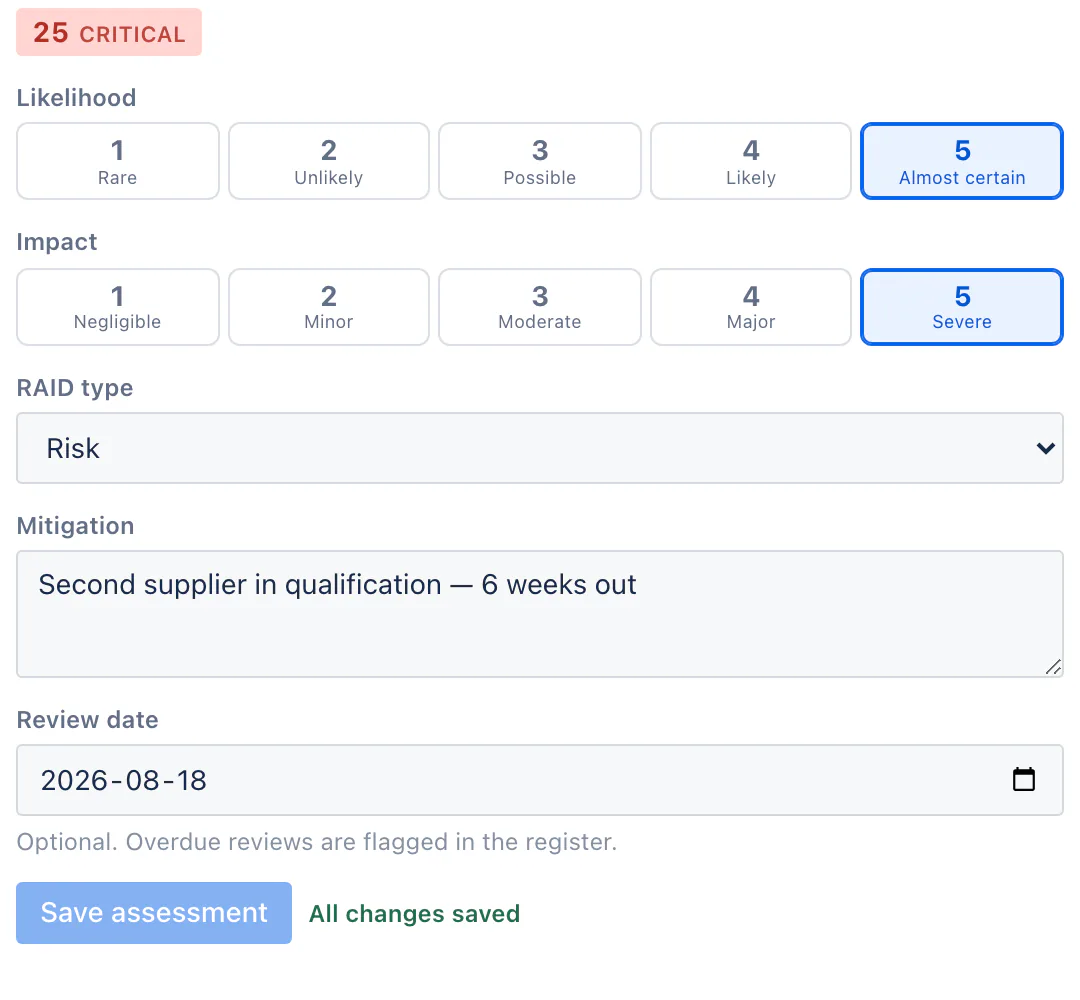
Open any issue and find the Risk assessment panel.
- Pick a likelihood from the first row of buttons.
- Pick an impact from the second.
- The score and its band appear at the top of the panel as you choose, before you save — so you can see whether an assessment lands where you expected.
- Optionally set the RAID type, write a mitigation note, and set a review date.
- Press Save assessment.
The panel writes only the fields you changed, plus the derived score. It never touches the summary, status, assignee, or anything else on the issue — it cannot, because the app is only permitted to write its own six fields.
A half-finished assessment has no score. If you set a likelihood but no impact, the risk is reported as not assessed rather than being scored as if the missing half were zero — a risk must never read as safe because nobody finished judging it.
The owner of a risk is simply the issue's assignee. There is no separate owner field to keep in step.
The matrix
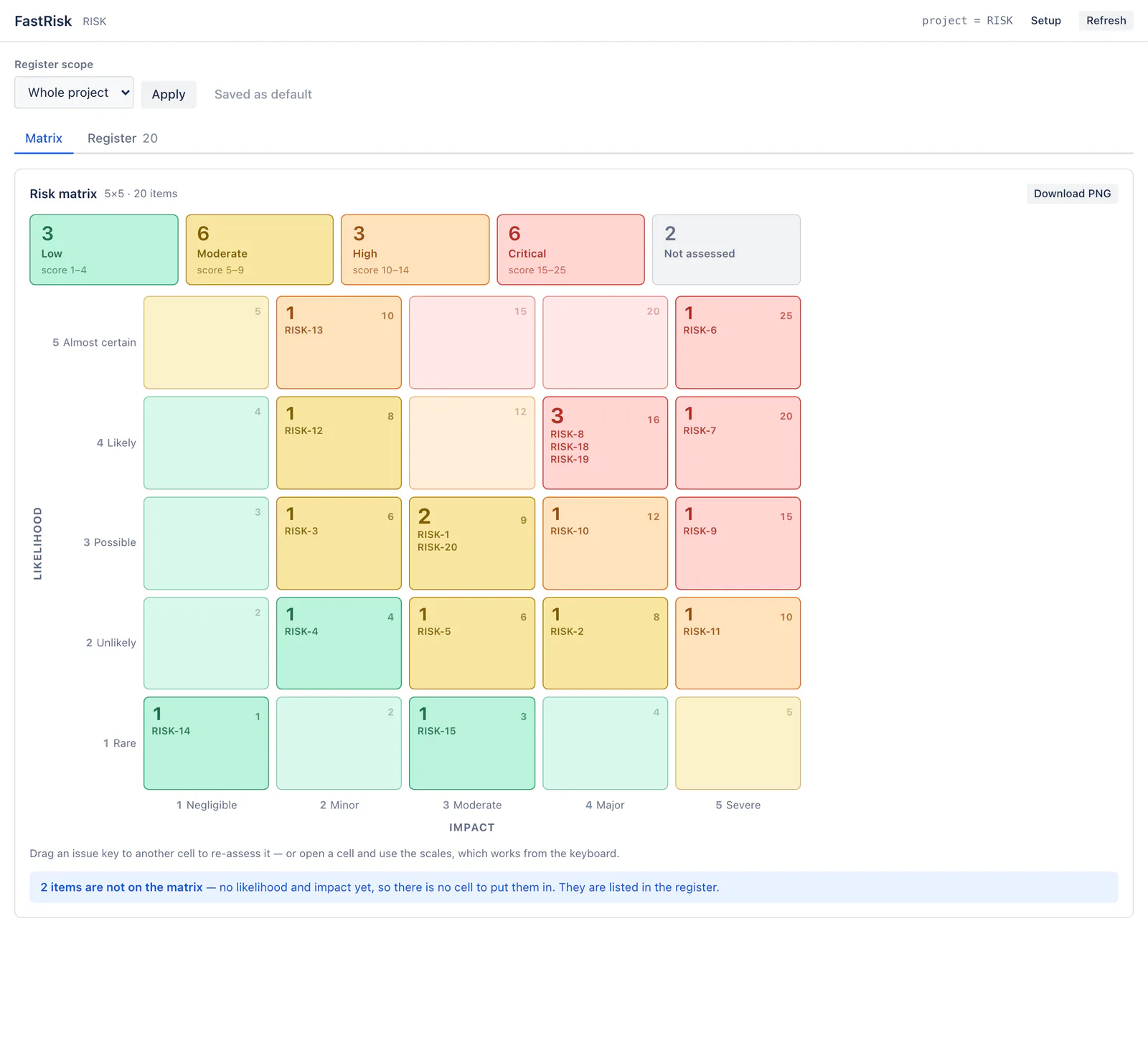
The Matrix tab draws the heatmap: impact across the bottom, likelihood up the side, and the critical corner at the top right — the orientation risk practitioners expect.
Each cell shows how many risks sit at that combination, the score for that cell, and the keys of the risks in it. Cells are coloured by band:
- Low, Moderate, High, Critical — four bands, with the score range for each shown on the tiles above the grid. On a default 5×5 matrix, Critical starts at 15.
The tiles above the grid count the register by band, plus a Not assessed tile. Select a cell to open its drill-down: every risk in it with key, summary, owner, status, mitigation and review date, a Re-assess action, and a link through to the issue itself.
Risks with no likelihood and impact have no cell to sit in, so the matrix says so underneath the grid and tells you how many there are. They are listed in the register.
The matrix always draws likelihood × impact, never the stored score field. If the two ever disagree, the axes are the truth and the score is stale — see when JQL disagrees with the matrix.
Re-assessing by dragging
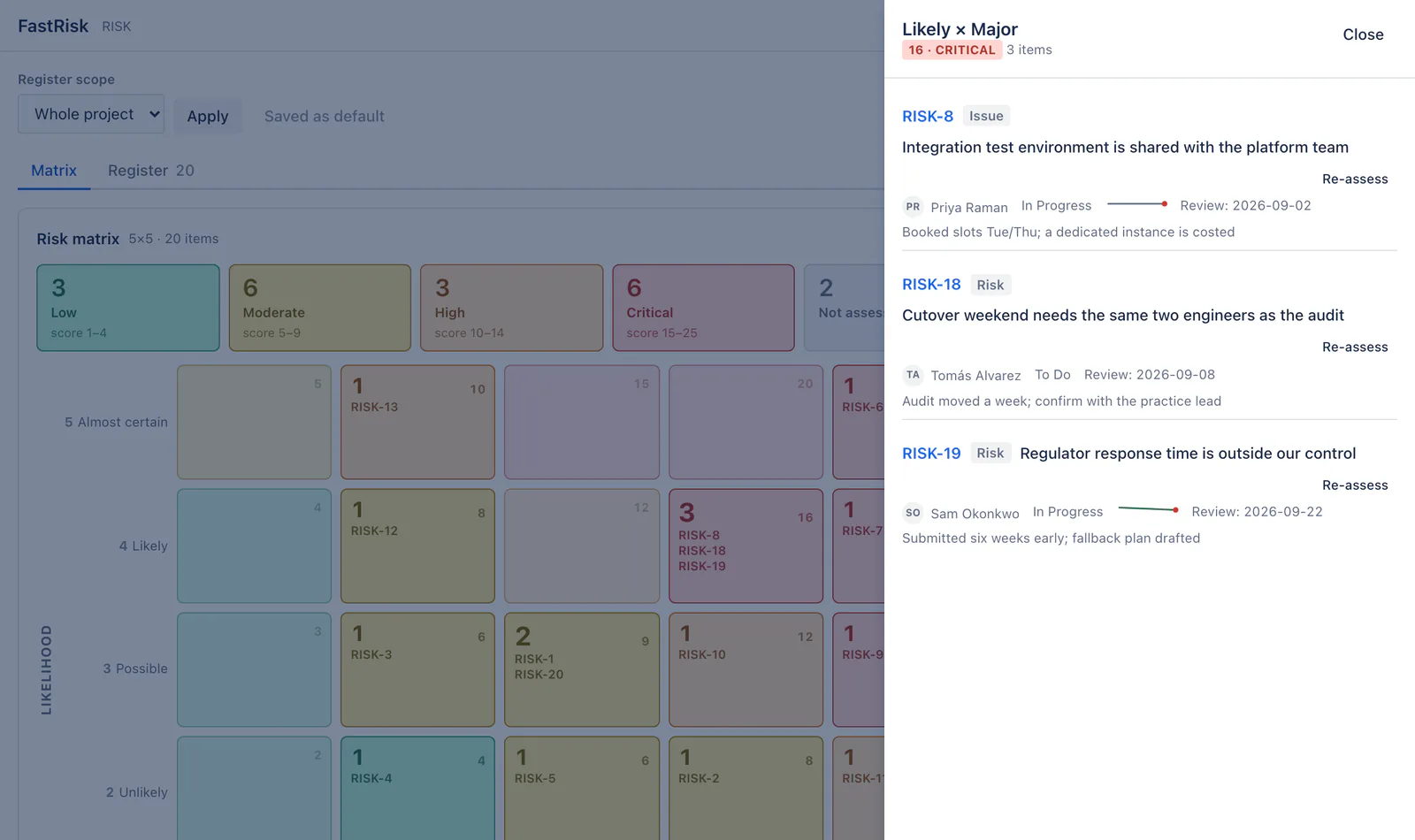
Drag a risk's key from one cell to another and it is re-assessed to that cell's likelihood and impact. Exactly two fields are written, plus the derived score, and Jira's own issue history records the change like any other edit.
Drag handles appear only if you have permission to edit issues in the project. If you can view but not edit, the matrix is read-only — you are not offered a gesture that would be refused.
Drag-and-drop cannot be driven from a keyboard. The equivalent route is to open the cell and use Re-assess, which opens the same editor and makes the same change.
The RAID register
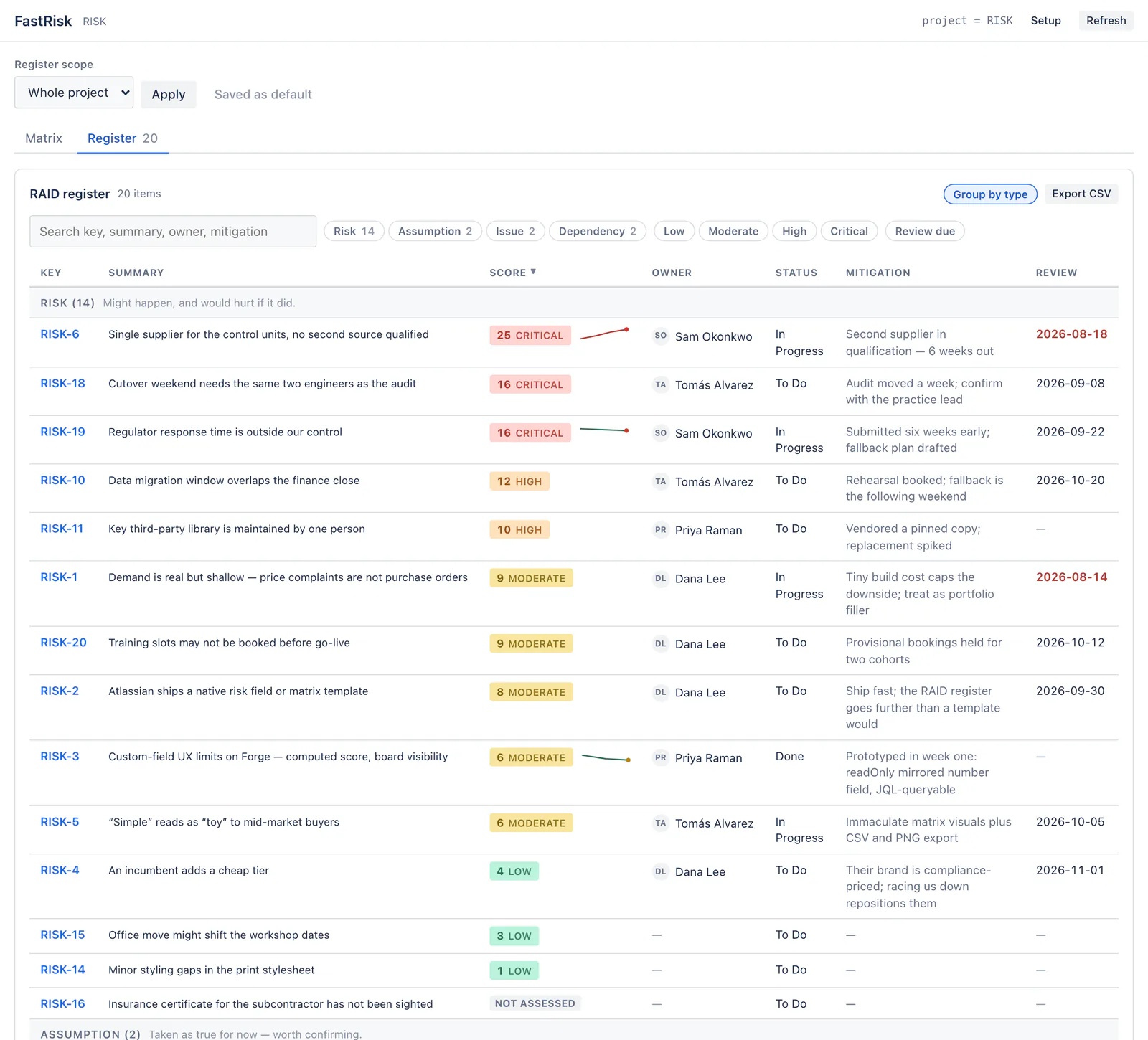
The Register tab is the list view, and the thing you take to a steering meeting. Each row carries key, summary, type, score with its band, owner, status, mitigation and review date.
- Search across key, summary, owner and mitigation.
- Filter by RAID type, by band, and by Review due for the risks whose review date has passed.
- Sort on any column by selecting its heading. The register opens worst-first; unassessed risks always sink to the bottom rather than sorting as zero.
- Group by type — on by default when there is more than one RAID type present. A project that only tracks risks gets a plain table instead of a single heading explaining a taxonomy it never opted into.
- Select a summary to open the assessment editor inline; select the key to go to the issue.
Where a risk has been assessed more than once, its score cell carries a small trend line. It is scaled against the matrix's own maximum rather than the range in the data, so a 3→4 wobble does not look like a 1→25 climb; the colour is the direction (rising, falling, flat) and the end dot takes its band colour. Risks assessed only once show no line — one point is not a trend.
Risks, Assumptions, Issues, Dependencies
A RAID log tracks four kinds of thing, and FastRisk treats them as one register with a type on each row:
- Risk — might happen, and would hurt if it did.
- Assumption — taken as true for now, worth confirming.
- Issue — already happening.
- Dependency — needs something outside your control.
An item with no RAID type set reads as a Risk. That default is deliberate: a team that only wants a risk register never has to learn the wider taxonomy, and a team that wants the full RAID log just starts setting the field.
Risk score in JQL
Because the assessment is stored in real Jira fields, Jira's own search can query it — which means saved filters, boards, dashboards and automation rules can too, without FastRisk being involved at all. This is the single most useful thing the app gives you.
"Risk score" >= 15 — every critical risk on the site.
project = ABC AND "Risk score" >= 10 AND resolution IS EMPTY — open
high and critical risks in one project.
"Risk review date" <= now() AND resolution IS EMPTY — reviews that
have lapsed.
"RAID type" = Dependency — the dependency log on its own.
"Risk likelihood" IS NOT EMPTY — everything that has been assessed.
Two notes. On native Jira surfaces — the issue navigator, List view, notification emails, Jira's own CSV export — the fields render with the app's default band names and scale labels, because those labels are fixed when the app is built and cannot read a project's own setup. And a project that has retuned its band thresholds should write its own numbers in JQL rather than assuming 15 means critical there.
Choosing what to show
The Register scope control at the top of the project page decides which issues the matrix and register cover. Three modes:
- Whole project — everything in the project you are looking at.
- Saved filter — give the numeric id of a Jira filter. Useful for a programme that spans projects, or for excluding done work.
- JQL — any query you like.
Press Apply to use a scope for your session. A project administrator also gets Save as default, which makes that scope what everyone in the project sees when they open the page.
Whatever the scope, you only ever see issues you could already find in Jira's own search. The query decides what to look at; Jira decides who sees what.
Matrix setup
Select Setup in the FastRisk header. Available to project administrators, and applies to that project.
- Matrix size — 3×3, 4×4 or 5×5. Changing the size re-seeds the labels and thresholds to sensible values for that scale, rather than truncating the old ones: a 3-point scale labelled "Rare / Unlikely / Possible" would read like a 5-point scale with holes in it.
- Likelihood and impact labels — the wording for each rung. The defaults on a 5×5 are Rare / Unlikely / Possible / Likely / Almost certain, and Negligible / Minor / Moderate / Major / Severe.
- Band thresholds — the upper bound of Low, Moderate and High; everything above the last one is Critical. The defaults are derived from the matrix size, so a 3×3 gets bands in the same proportions as the conventional 5×5.
Configuration is per project and never a prerequisite — a project that has never been set up uses the defaults.
If you narrow a matrix that already has assessments, risks scored above the new scale have no cell to sit in. The matrix reports those separately from risks that were never assessed, so the two are never confused.
Review dates and reminders
Set a review date on a risk and the register flags it once the date passes; the Review due filter shows only those.
FastRisk also runs a weekly sweep. When a review date has just lapsed, it adds a comment to the issue mentioning the owner — which means Jira's own notifications reach them, respecting whatever notification preferences they already have. The comment says when the review was due and what the current assessment is.
It is designed not to nag:
- Each lapse is mentioned once. The sweep looks for reviews that came due in the last few days, so a review that lapsed months ago is not raised again every week until somebody acts.
- Move the review date forward and let it lapse again, and you get a fresh reminder — one per lapse, not one ever.
- Resolved issues are skipped. Nobody needs reminding to review the risk on a ticket they closed.
The reminder is a comment rather than an email because FastRisk has no ability to send mail: it cannot reach anything outside your Atlassian tenant. A comment is the better mechanism anyway — it is visible to watchers and stays attached to the thing being reminded about.
The dashboard gadget
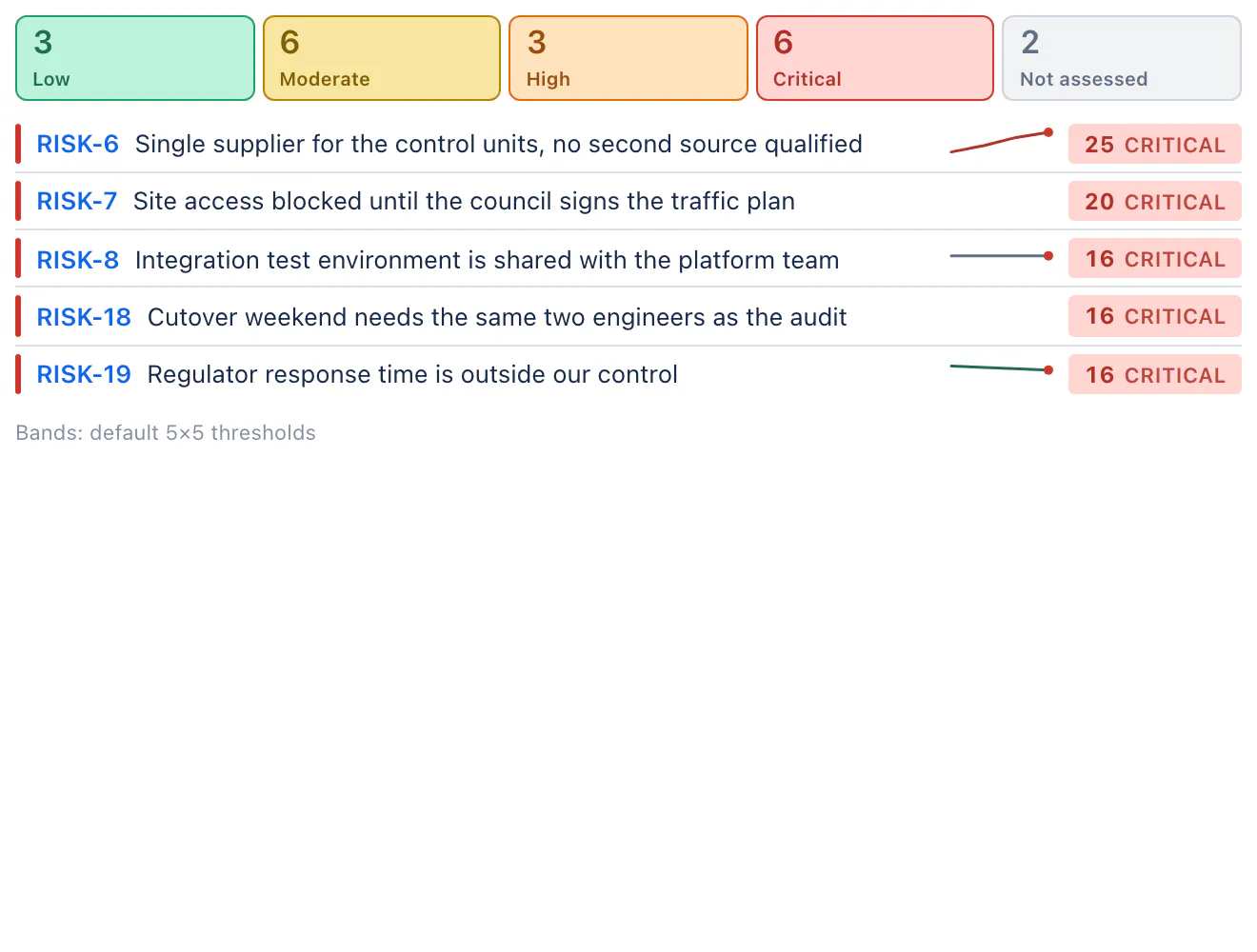
Add the FastRisk gadget to any Jira dashboard for a view across projects — the project page is bound to one project by design, so this is the portfolio picture.
- Add the gadget, then use its Edit menu.
- Which risks? — any JQL, for example
project in (ABC, DEF) AND resolution IS EMPTY. - How many to list — 3, 5, 10 or 20 top risks.
- Refresh every — how often Jira re-renders it.
The gadget shows band tiles and a worst-first list rather than the 5×5 grid: a grid squeezed into a dashboard column is unreadable, and the tiles carry the same shape — how much sits in each band. Click through to a project page for the grid itself.
Two things to know. The gadget runs its query as whoever is looking at the dashboard, so a dashboard shared widely shows each person only the issues they could already find. And its bands are the app defaults, stated in the footer: a view spanning several projects has no single project whose thresholds are the right ones, and silently adopting one project's would mislabel every risk from the others.
Exporting: CSV and PNG
Export CSV on the Register tab writes what is on screen — your current search, filters and sort — not the unfiltered set. That is usually what you want for a report; clear the filters first if you want everything.
Download PNG on the Matrix tab saves the heatmap as an image, with the axis captions, a band legend showing each band's score range, and the date. It is rendered at double resolution so it holds up on a projector or in a slide deck, and it matches the colour theme you are viewing in.
Both files are generated in your browser. Nothing is uploaded anywhere to produce them, because there is nowhere for FastRisk to upload to.
When JQL disagrees with the matrix
The Risk score field is a mirror: FastRisk writes it alongside the two axes so that Jira's search has a number to query. The axes are the assessment; the score field is a copy of their product.
Occasionally the two can fall out of step — an interrupted save, an issue imported from CSV, a restore from an old uninstall. FastRisk detects this on every row and says so rather than hiding it, because a register that reads correctly on screen while Jira's own search answers wrongly for the same issue is the worst kind of quiet error.
When it happens you get a warning above the register and a Repair action on the affected row, plus Repair all in the warning. Repairing rewrites the score field from the axes and touches nothing else. A very large backlog is repaired in batches — repair again to continue, and the app tells you how many were left.
One case is deliberately not repaired. If a likelihood or impact holds a
value outside 1–5 — typed directly into the field, or set by an import or an automation
rule — the row says so and asks you to reassess instead. The stored score is probably
the right product of what was intended, and clearing it would drop the issue out of
every filter and board built on "Risk score".
Limits and things to know
- The project page loads up to 2,000 issues per scope, and the dashboard gadget up to 500 (a dashboard may hold several). If a scope matches more, the page says so plainly rather than quietly showing part of the picture — narrow it with a filter or JQL.
- A risk edited an extraordinary number of times may show its assessment one change behind. FastRisk says so when it happens, and it does not offer to repair a score it could not read reliably.
- Fields are invisible on the issue view until an administrator adds them to screens. They are queryable in JQL immediately and the assessment panel needs no screen setup, so this costs inline visibility, not function.
- Band names and scale labels on native Jira surfaces are the app defaults, not your project's. A field's rendering is fixed when the app is built and cannot read per-project configuration.
- Drag re-assessment is pointer-only. Use a cell's Re-assess action instead.
- FastRisk is not a compliance tool. No control libraries, no framework mappings, no attestations, no evidence workflows. If your organisation needs validated compliance processes, this is not that product.
Permissions & your data
- FastRisk runs 100% on Atlassian Forge inside your own tenant. It declares no egress permissions and exposes no inbound endpoints, so your risk data cannot leave Atlassian — which is what makes it eligible for Atlassian's Runs on Atlassian programme.
- It stores no personal data at all — no names, no email addresses, not even an Atlassian account ID. Risk owners are read from Jira when a page is rendered and never written to the app's storage.
- The assessments are Jira data, not app data. They live in custom fields on your issues, under Jira's own retention, export and residency.
- The only things FastRisk stores of its own are your per-project matrix setup and a small marker per reminded issue (an issue id and the review date already mentioned, so a reminder is not repeated). Markers are deleted automatically after 120 days.
- Reads run as you, so Jira filters them: FastRisk cannot show you an issue you could not already find.
- Writes are checked per issue. Your Jira permission to edit that specific issue is re-verified on the server before every write, not merely when the page loaded — so a stale browser tab cannot write something you are not entitled to.
- The app can only write its own six fields. That is enforced by the Atlassian platform, not by our good intentions: the interface FastRisk uses accepts only fields the app owns. It cannot alter a summary, status, assignee, or another app's field.
- Uninstalling deletes the app's own storage and leaves your assessments alone. Jira hides an uninstalled app's fields and keeps their values for 30 days, so reinstalling within that window restores every assessment. Deleting your risk register on uninstall would be destroying your records, not tidying up ours.
See the privacy policy and security policy for the full picture.
Troubleshooting
I can't find the Risk assessment panel on an issue
It sits with the issue's other detail panels; on a narrow window it may be collapsed under a "Details" or "More fields" section. It does not require any screen configuration. If it is missing entirely, the app may not be installed on the site.
The six fields don't show on my issue view
Expected until a Jira administrator adds them to the relevant screens — a Jira behaviour for app-owned fields. You do not need to: assess from the Risk assessment panel, and query the fields in JQL, without touching screen configuration.
My matrix is empty but the project has plenty of issues
An issue only appears on the matrix once it has both a likelihood and an impact. The count of unassessed items is shown under the grid, and they are all listed in the register — assess one from its issue panel, or from the register row, and it appears.
A risk is in the register but not on the matrix
Either it has no assessment yet, or its score is off the scale for the current matrix size — for instance a 5×5 assessment in a project since narrowed to 3×3. The notice under the grid distinguishes the two. Widen the matrix in Setup, or reassess the risk on the current scale.
"Risk score" >= 15 doesn't return a risk the matrix shows as critical
The score field has fallen out of step with the axes. The register flags that row and offers Repair — see when JQL disagrees with the matrix. If the project has retuned its band thresholds, also check the number: 15 is the default boundary, not necessarily yours.
I can't drag risks between cells
Drag handles appear only if you can edit issues in that project, and only while the subscription is active. Drag also cannot be driven from a keyboard — open the cell and use Re-assess.
Nobody got a review reminder
Check that the issue is unresolved, that the review date has actually passed, and that it lapsed recently — the sweep raises each lapse once, in the days after it happens, rather than repeating for reviews long overdue. Move the review date to a new date and let it lapse to get a fresh reminder. The sweep runs weekly, and a reminder mentions the issue's assignee, so an unassigned risk gets the comment without notifying anyone in particular.
The gadget says it has nothing to show
Give it a JQL query in its Edit menu — a new gadget has none. If it has a query and still shows nothing, remember it runs as the person viewing the dashboard: check that you can find those issues in Jira's own search.
The register says it's showing the first 2,000 items
Your scope matches more than the page loads at once. Narrow it with a saved filter or
JQL — for example adding resolution IS EMPTY — so the matrix reflects the
whole register rather than part of it.
"FastRisk license is inactive"
The subscription has lapsed or has not started on your site. Saving assessments is paused, but your register stays visible and exportable — a billing lapse should never lock you out of your own risk data, which is in your Jira fields regardless. A site administrator can update the subscription in Atlassian Administration → Billing.
Something else
Email support@niramasolutions.com with your Jira site URL, the project key, and a screenshot if the interface is involved. We answer within two business days.