 Nirama
Nirama Solutions
Drag the bar. Jira changes.
Most Jira roadmaps are a picture of your plan. FastGantt is the plan: move a task and the Jira dates move with it, on the real issues your team already works from. Critical path, baselines, dependencies with lag, and a workload view that knows who is over capacity — and it stays responsive while you drag, because the schedule is recomputed in your browser rather than at a vendor's server.
- On the Atlassian Marketplace
- Runs on Atlassian
- No data egress
- Account IDs are the only personal data stored
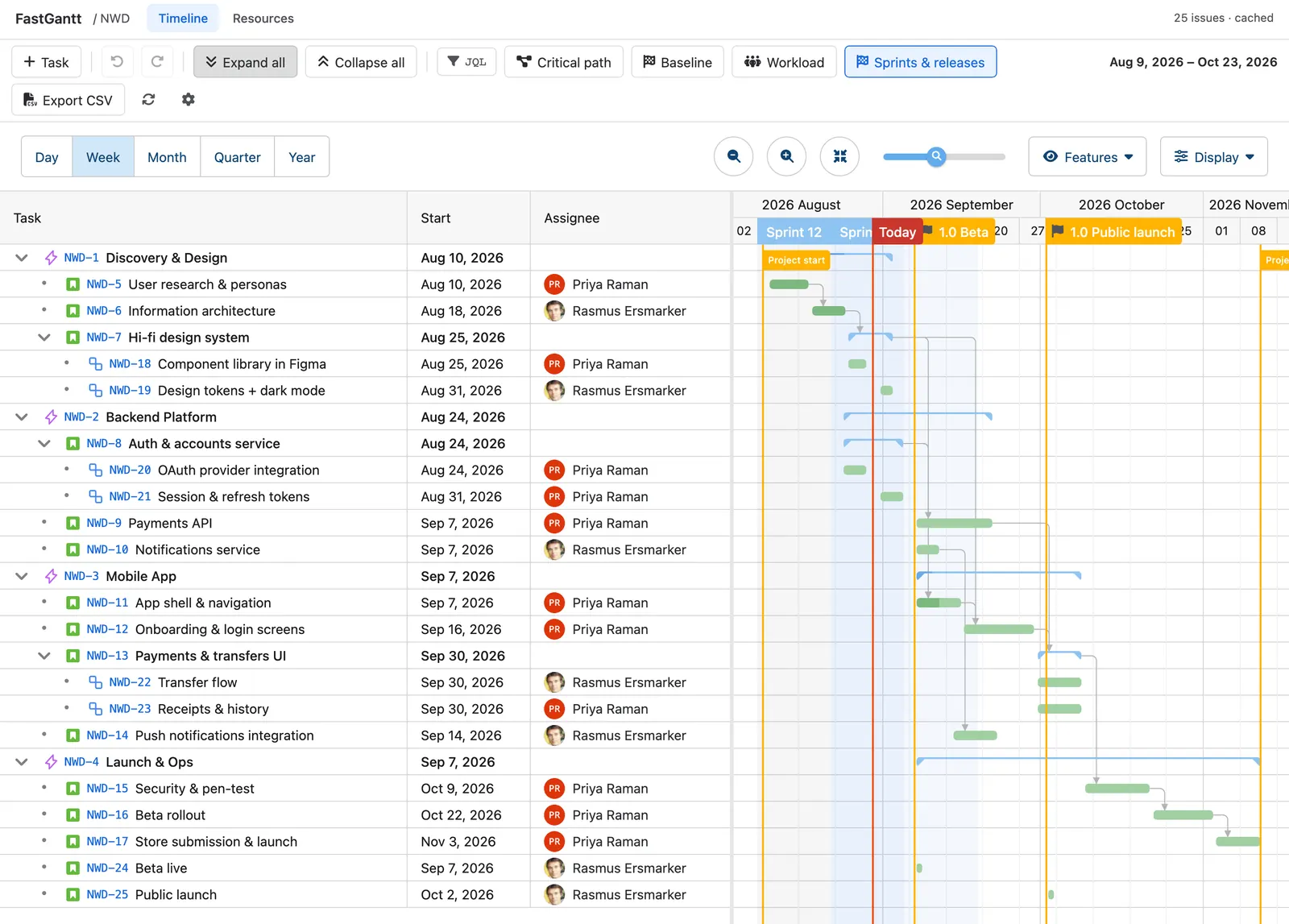
A schedule that writes back, not a read-only picture
The plan and the issues are the same thing. There is no import, no export, no nightly sync and no second copy of your project to keep in step.
Two-way by design
Drag a bar, resize it, change a duration or reassign a task, and the mapped Jira fields are written immediately — as you, so Jira enforces your own permissions. If a field cannot be written, the app says which one and why rather than failing silently.
Undo that reaches Jira
There is no Save button, so there is a real undo: Ctrl+Z puts the previous values back in Jira, not just on screen. Rescheduling a plan in front of your team stops being a thing to be nervous about.
Built for the plan you actually have
The scheduling engine runs in your browser, so a ten-thousand-task plan scrolls and reschedules at speed. Nothing is computed on our servers, because there are none.
The parts a Gantt is actually bought for
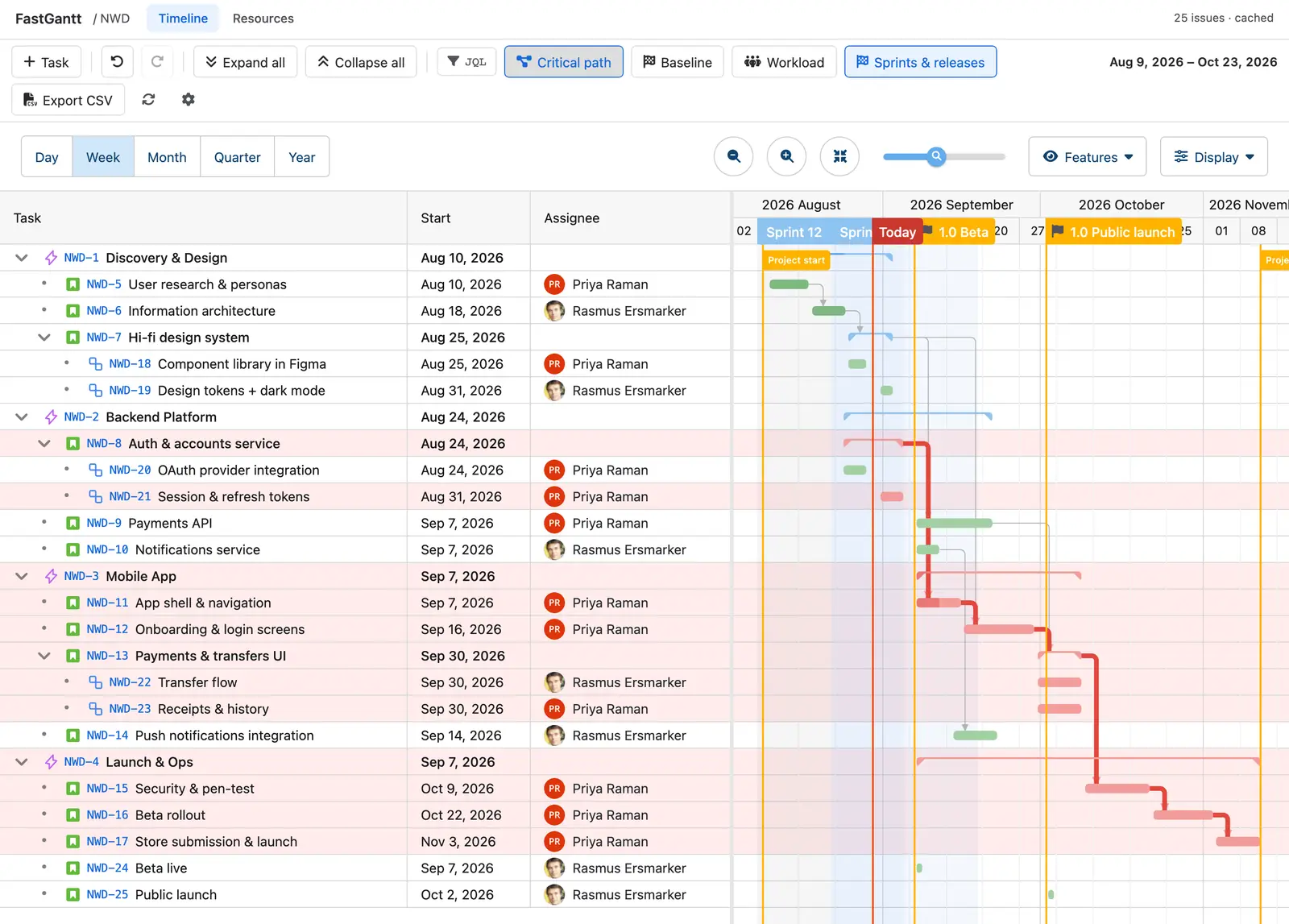
Critical path and real dependencies
Finish-to-start, start-to-start, finish-to-finish and start-to-finish links with lag, drawn from your Jira issue links — double-click any line to change the type or the lag.
The critical chain is one toggle, and it highlights the rows as well as the bars, so the sequence that decides your date reads in the task list too.
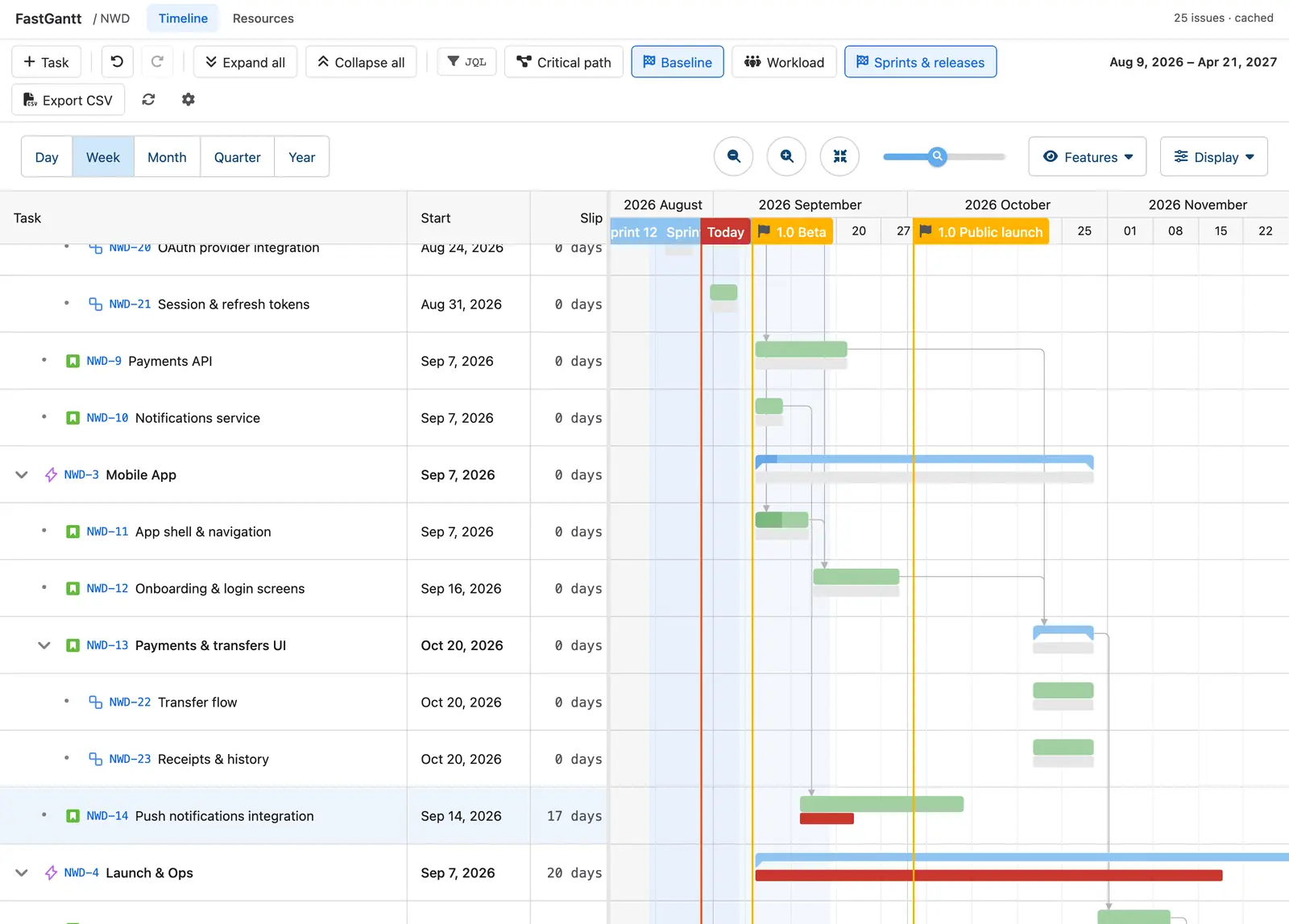
Baselines, and the drift from them
Snapshot the plan when you commit to it, then see exactly where today's schedule has moved: behind, ahead or on time, per task, with the slip in whole days in its own column.
Compared on days, not timestamps — an untouched task reads as on time rather than "seven hours ahead".
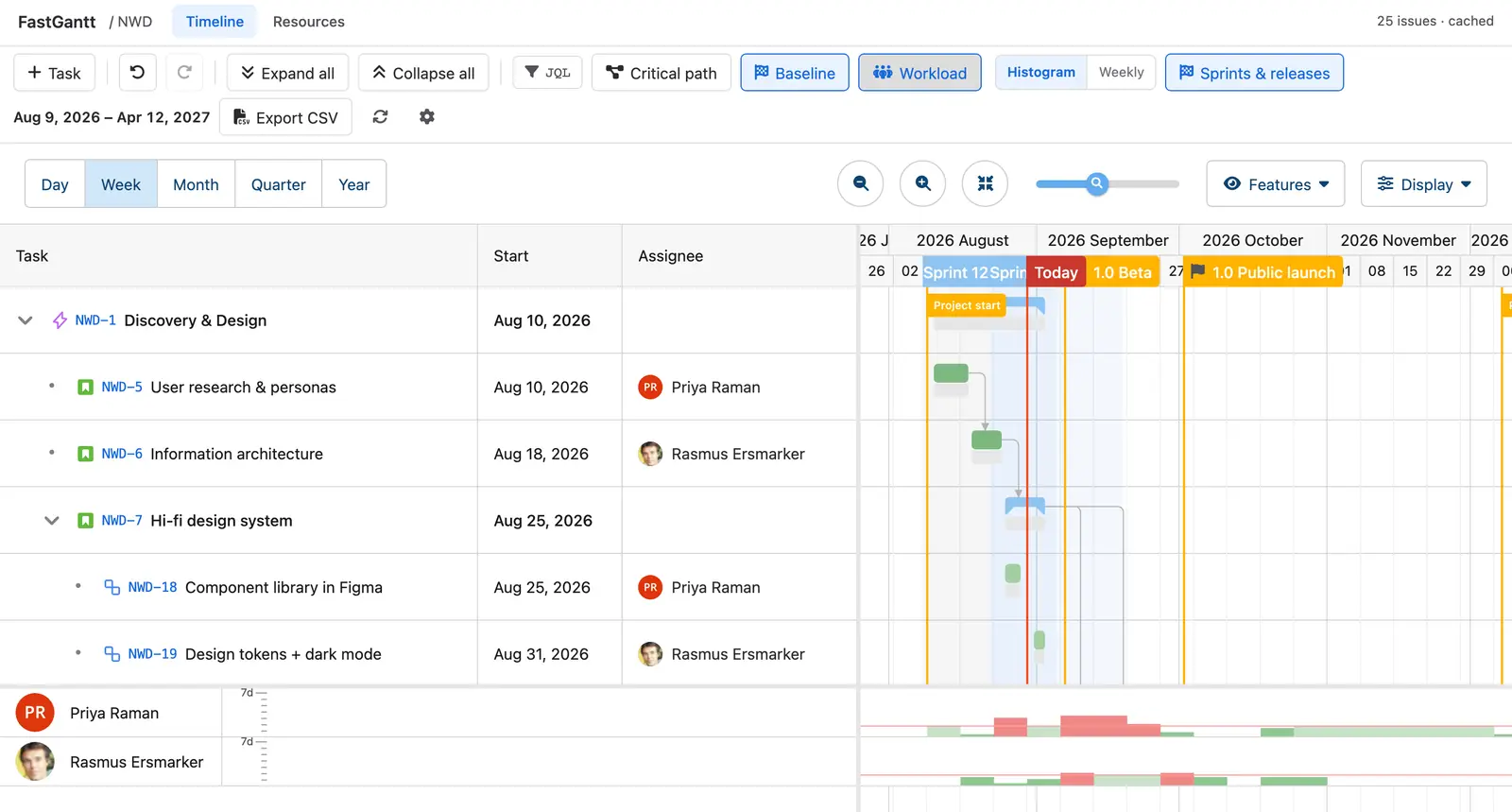
Workload you can act on
An allocation histogram that shares the timeline's own axis, plus a weekly view, both built from the scheduled dates rather than the raw fields — so tasks the engine placed from an estimate are counted too.
Overallocation shows in red, per person, in the same window as the plan that caused it.
Edit the issue, not a copy of it
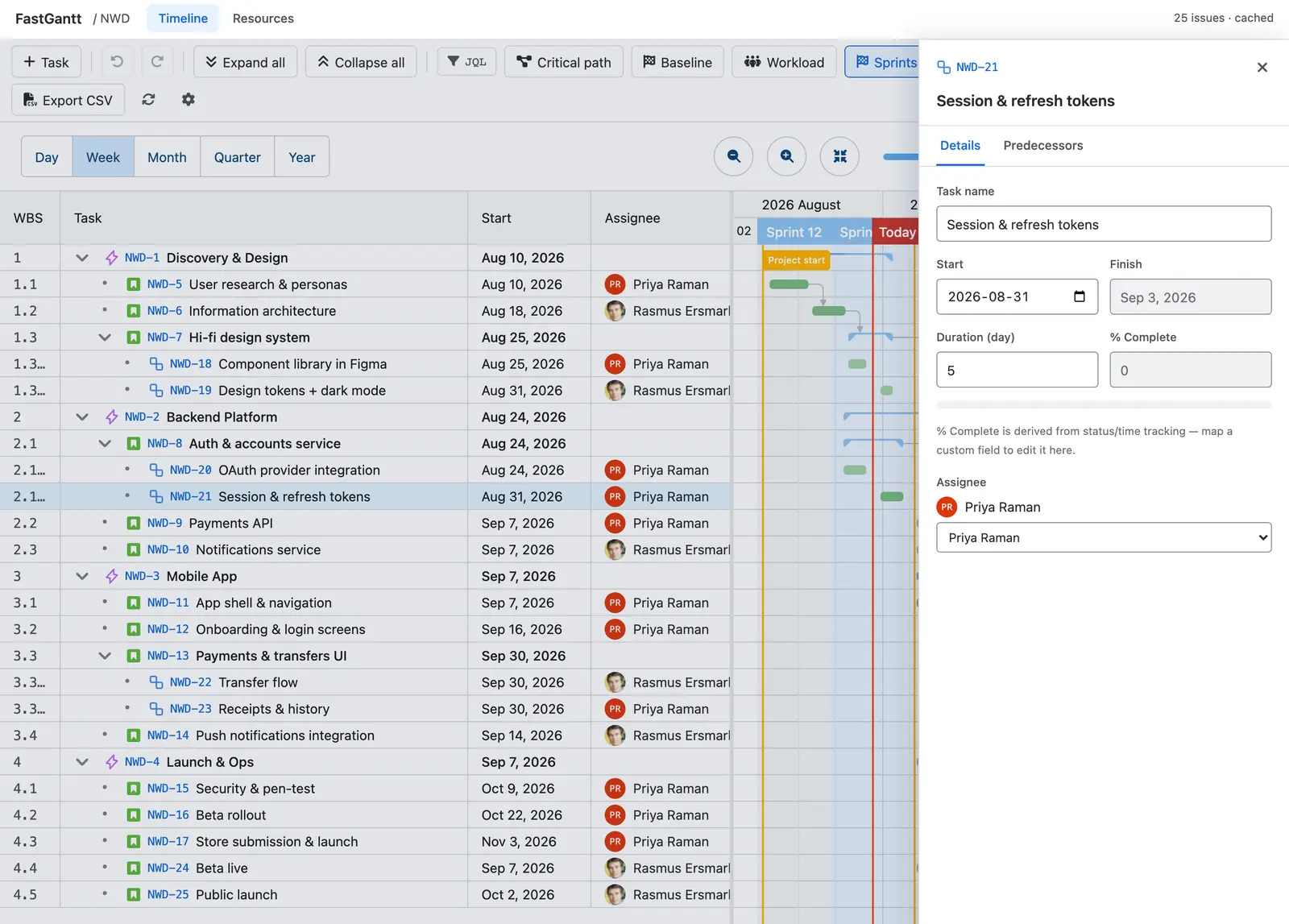
Open any task for its Jira fields — name, start, finish, duration, assignee — and edit them in place. Every change is written to the issue as you, so Jira enforces your own permissions.
When a field cannot be written, the app names it and says why, instead of failing quietly.
What FastGantt does not claim
Every app has edges. These are ours, in writing, so nobody finds them after installing.
Issue security inside a project is not re-applied per viewer
The cached plan is built once per project, not once per person, so anyone who can open the project's FastGantt page sees the whole plan. Project permission is checked on every request; Jira issue-level security distinctions between members of the same project are not. If you use issue security levels within a project, take that into account.
It writes the fields you map, and only those
Jira decides per project and per issue type which fields a screen accepts. FastGantt maps start, finish, duration, progress and assignee — and when Jira refuses one, it tells you which field and keeps the rest.
It cannot turn a task into a sub-task
Jira's public API has no supported path for that conversion, so neither do we. You can re-parent a task under an epic by dragging; converting between levels needs Jira's own Move action, and the app says so rather than failing.
It does not delete issues
The app declares no delete permission at all. Removing work is Jira's job, done in Jira, where your audit trail and your admin controls already live.
What it stores, in one paragraph
FastGantt keeps a cache of the Jira issues in the projects where it is used — the key and the fields mapped for the timeline — so that large plans open in seconds. It lives in Forge storage inside your own Atlassian tenant; we hold no copy and cannot read it. The only personal data it stores is the Atlassian account ID of an assignee, and the ID a user's own view preferences are saved against: no names, no email addresses, no avatar URLs, no time zones. The names and faces you see on the timeline are read live from Jira, with your permissions, each time you open a plan. Uninstalling deletes everything the app stored.
How FastGantt compares to the alternatives
FastGantt is not the cheapest Gantt app and the comparison page says so in those words. It also works out what Structure.Gantt really costs once you add the base app it cannot run without — $479 a month at 100 users, not $127.
FastGantt for your Jira site
Built entirely on Atlassian Forge, so it runs inside your own tenant and sends nothing anywhere. The guide covers every feature, every limit and the troubleshooting section.